📝 Introduction
You finally design your namecard, send it off to print… and then part of your logo or phone number gets chopped off. This namecard cut off print problem is one of the most common issues we see.
At Siang Heng Printing Services, we hear this frustration often—and it almost always comes down to misunderstanding bleed and safe zones.
🔍 What Causes Cropping in Printed Namecards?
Printing machines require a tiny margin of error when trimming. That’s why designers need to include:
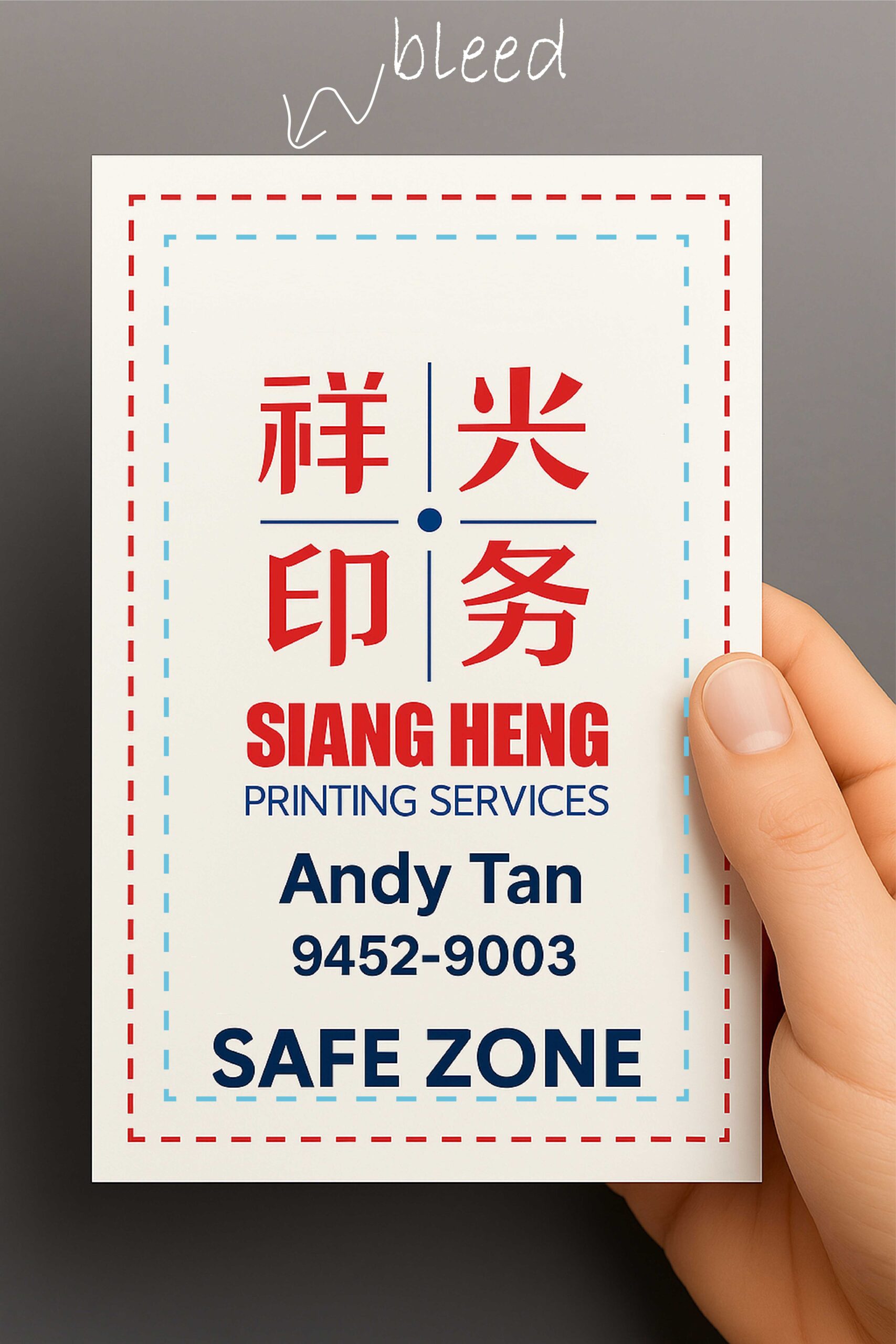
- Bleed: Extra background that extends beyond the final trim size, usually 3mm.
- Safe zone: An inner zone where important content should sit—about 5mm in from the edge.
If your design fills the entire canvas without bleed, or if text is too close to the edge, it’s at risk of being trimmed.
💡 How Siang Heng Printing Services Solves This
At Singapore’s #1 print shop, Siang Heng Printing Services, we provide:
- Free print-ready templates with bleed and safe zone guides
- File checks to catch designs with trimming risks
- Advice on layout and sizing before print
We treat your namecards like ambassadors for your brand—clear, precise, and professionally cropped. Avoiding a namecard cut off print issue comes down to following standard bleed conventions, similar to those outlined in this printing bleed reference.
📌 Pro Tips for Perfect Namecard Layouts
- ✅ Use 3mm bleed around all edges
- ✅ Keep logos and text 5mm inside the trim line
- ✅ Always save your final file as PDF or AI with crop marks
💬 Not sure if your design is aligned? Send it to Siang Heng Printing Services for a complimentary layout review before printing.
🔗 Related Services
Explore more:
🏷️ Tags
Namecard design tips, print bleed, safe zone guide, Siang Heng Printing Services, Singapore print shop, crop mark issues
📏 How to Set Up Bleed in Common Design Tools
Setting up bleed correctly depends on the software you’re using:
- Illustrator/InDesign: Set bleed to 3mm when creating your document, under File > Document Setup.
- Canva: Canva doesn’t show bleed by default, so design your card slightly larger than the final size and keep text centred well within the edges.
- Photoshop: Use Image > Canvas Size to add 3mm on all sides before exporting your final flattened file.
❔ Frequently Asked Questions
Do you check my file for bleed issues before printing?
Yes — every file goes through a free check before we print. If bleed or safe zone issues are spotted, we’ll flag them and suggest fixes before your order proceeds.
Can I fix bleed issues myself without design software?
It’s tricky without design software, since bleed needs to be added at the file level. If you don’t have access to Illustrator, InDesign, or Canva, send us your file and we can advise on the best way forward.
Does bleed apply to all print products, or just namecards?
Bleed applies to almost every print product with a trim edge — stickers, flyers, posters, and packaging all need it, not just namecards.